APA Format (7th edition)
APA format is how your paper looks. It covers layout and formatting, such as margins, font, page numbers, headings, paragraphs, quotations, figures, tables, and the reference list.
APA style is the full set of APA rules. It includes formatting, writing, and referencing.
Many schools, colleges, and universities require APA format. Marks can be lost if it is not used correctly.
Learn or Review APA Format
You can use this quiz to learn APA format, brush up on the main rules, or check how APA format differs from other styles.
It covers the main parts of APA format, including margins, font, page numbers, headings, paragraphs, quotations, figures, tables, and citations.
This is a good place to start if you like active learning.
Prefer to read instead? Use one of the sections below.
Choose Where to Start
New to APA format?
Start here if you know little or nothing about APA format.
You will see the main parts of an APA-formatted paper and what each part should look like.
Need a quick review?
Start here if you already know some APA format and just need a reminder.
You will see short explanations of the main parts of an APA-formatted paper.
Want detailed help?
Choose this section if you want step-by-step help with each part of an APA-formatted paper.
You will see what each part should look like and how to format it in Word.
Get detailed help.
Start With the Basics
The main parts of an APA-formatted paper usually include:
- 1-inch (2.54-centimeter) margins
- an APA-allowed font and size
- page numbers in the header
- a title page
- an abstract page, if required
- the main body, including headings, paragraphs, quotations, figures, and tables
- a reference list and in-text citations
Some requirements are different for student papers and professional papers.
Your instructor may also change the requirements. For example, you may not need an abstract. You may also be asked to include a Table of Contents, a List of Figures, or a List of Tables.
See how to write a paper in APA format for a summary of the main parts of an APA-formatted paper.
Quick Review
Use these short explanations if you already know some APA format and just need reminders.
See how to write a paper in APA format for an overview of the main parts of an APA-formatted paper.
Or choose a topic below if you want to go straight to a specific part.
Paper Setup
Margins
See the margin requirements for an APA-formatted paper.
Font Type
See the fonts and font sizes that are allowed in an APA-formatted paper.
Headers
See what goes in the header of an APA-formatted paper, including page number, and running head where required.
Title Page
See what to include on an APA-formatted title page and what it should look like.
Abstract
See what an abstract is, what to include, and what a correct abstract page looks like.
Main Body
Headings
See what headings in APA format are and what correct headings look like.
Paragraphs
See what paragraphs in APA format look like, including the main layout features.
Quotations
See how quotations should look, including short quotations and block quotations.
Footnotes
See what footnotes are, when to use them, and what they should look like.
Figures and Tables
Figures
See what figures in APA format are, what parts a figure needs, and what a correct figure looks like.
Tables
See what tables in APA format are, what parts a table needs, and what a correct table looks like.
Table of Contents
See how to build a table of contents in an APA-formatted paper using Microsoft Word.
Citations
See how to cite different sources in APA format (e.g., books, journal articles, webpages).
Detailed Description
Use these step-by-step instructions if you want detailed help with each part of an APA-formatted paper.
Paper Setup
Margins
See how to check and set margins in APA format using Microsoft Word, and how to fix them if they are wrong.
Font Type (opens in new tab)
See the fonts that are allowed in an APA-formatted paper.
Headers
Page numbers
See how to insert and format a page number in APA format using Microsoft Word.
Running head
See how to add and format a running head in APA format (when one is required) using Microsoft Word.
Title Page
See how to write a title page in APA format using Microsoft Word.
Abstract
See how to write an abstract page in APA format using Microsoft Word.
Main Body
Headings
See how to write headings in APA format using Microsoft Word, including how to set up each heading level.
Paragraphs
See how to write a paragraph in APA format using Microsoft Word, including how to set the first-line indent and line spacing.
Quotations
See how to write a quotation in APA format using Microsoft Word, including how to format a block quotation.
Footnotes
See how to insert and write a footnote in APA format using Microsoft Word.
Figures and Tables
Figures
See how to create a figure in APA format using Microsoft Word, including figure number, title, and notes.
Tables
See how to create a table in APA format using Microsoft Word, including table number, title, and notes.
Table of Contents
See how to create and update a Table of Contents in APA format using Microsoft Word.
Citations
See how to cite different sources in APA format (e.g., books, journal articles, webpages).
Summary
Correct use of APA format helps your academic writing look clear and consistent.
Many schools, colleges, and universities require APA format, and marks can be lost if you do not follow it (see Figure 1).
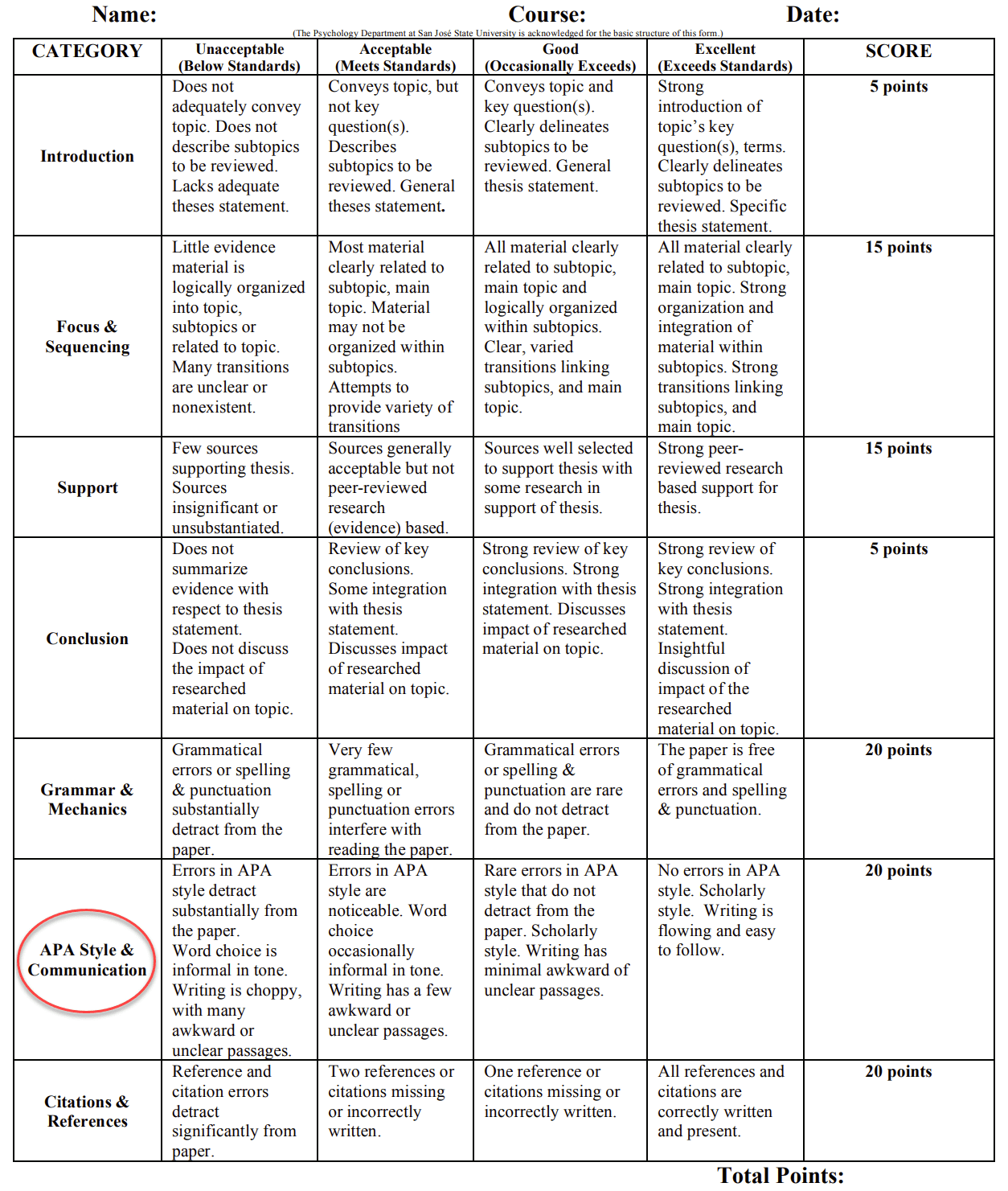 Figure 1: Marking Rubric That Includes APA Criterion
(Source: University of Kansas. (n.d.). Research paper grading rubric. http://www.people.ku.edu/~tkrieshok/epsy890/report_rubric.pdf)
apaword provides step-by-step instructions, practical tips, and Microsoft Word examples.
These topics are covered: margins, font, header, title page, abstract, main body formatting, figures, tables, and citations.
Note: These steps are shown in the latest Word for Microsoft 365. They also work in Word 2021, 2019, 2016, and 2013.